Cameraman Tower Defense Beginner Guide
Start Cameraman Tower Defense with a practical route through equipped units, match platforms, lane coverage, upgrades and first-match review.
Equip an affordable opening attacker, enter a match platform, and use its visible range to cover the lane. Inspect the first leaks before deciding whether to upgrade or add a placement.
View reference image
On this page
Start a match, cover the lane, and watch the first leaks
The official description gives a short, concrete route into Cameraman Tower Defense: step onto a platform, place cameramen and other units against invading toilets, and beat waves to win. Begin by learning that loop on the easiest difficulty offered by your current match. Equip the units you intend to use, inspect where enemies travel, and place an affordable attacker where its visible range covers the lane.
This guide covers Aligators Games’ experience at Roblox place 132929771812494, universe 10762636904. It does not cover Cameraman Toilet Tower Defense or other similarly named games. The official description was checked October 16, 2026. VendoPlus’s October 10 gameplay and an October 11 AllThingsHow report provide dated examples beyond that brief description. The recommendations here are planning advice, not a claimed personal clear.
1. Check your units before entering a platform
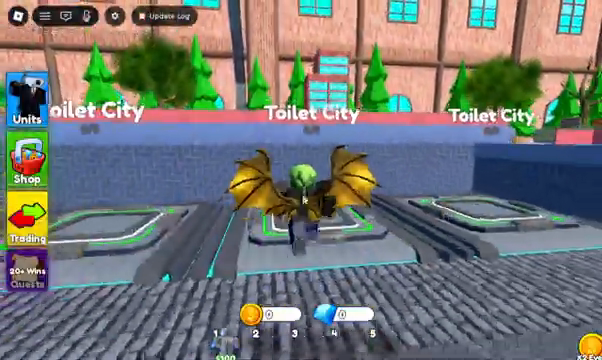
Inspect the current Units menu and make sure the units you want are equipped. A unit in a roster and a unit available to place during a match are different things to verify. VendoPlus’s short guide demonstrates a lobby unit menu before entering Toilet City; use that as an interface example while following your current labels and prompts.
Read each available unit’s description and costs before deciding its job. Your first lineup needs an attacker you can afford early, because an expensive option that cannot be placed yet does not cover the first wave. This is a reason to understand a low-cost unit you already own rather than copy a creator’s entire lineup. No specific rarity or named purchase is required by this guide.
The same video and the AllThingsHow report show a summon system in the lobby. If you use it, read the current currency, displayed price and odds. A random summon cannot guarantee the unit pictured most prominently. Check the resulting roster before entering a match and avoid assuming that a creator’s lucky pull will also happen on your account.
2. Follow the actual platform prompt
The developer explicitly says to step onto a platform to start a match. The dated tutorial shows Toilet City entry. Look at the platform’s current destination and displayed conditions before joining, especially if you are trying to play with friends. Wait for the game’s own transition rather than assuming an external guide’s menu sequence applies to every device or update.
The Roblox API’s maximum server size describes the experience server, not necessarily the number of players permitted in one match. Do not use that number to plan a team. Read the pad or match interface for actual capacity and ensure friends are entering the same destination. If a place looks different from the tutorial, first check the developer and place ID before treating it as a new feature.
On arrival, inspect any difficulty vote and the information it provides. AllThingsHow reported Easy, Normal, Hard and Insane on October 11. Those names are dated reporting rather than an official permanent mode list. Choose the easiest available option for learning, and use the difficulty progression guide after you can recognize why a run succeeds or fails.
3. Find the route before placing an attacker
Look for the entry point, the path enemies follow and the base you are defending. Place a first affordable attacker beside a section it can cover, using the range preview where available. A strong-looking unit outside useful coverage cannot solve a leak. The beginner task is to establish a visible link between placement and actual attacks.
Bends can be useful places to evaluate coverage because a circle may overlap more than one portion of a lane. That is general placement reasoning, not a claim about a hidden damage bonus. Check the actual range preview and watch the first enemies rather than assuming every bend is automatically best. Terrain and valid placement areas still matter.
Keep your view on the first attackers long enough to see whether they fire and where enemies leave their reach. If toilets continue toward the base, note whether the issue is uncovered path, insufficient damage during coverage, or saving too long before placing anything. These problems call for different responses, so a blind additional placement may spend cash without fixing the cause.
4. Inspect upgrades before filling every available space
The VendoPlus example opens upgrade information during combat. AllThingsHow also describes selecting a placed unit to inspect damage, range, cooldown and the next upgrade. Use your current panel to compare the options; do not memorize an old stat table as a current rule. An upgrade can change more than one property, and the available information may differ between units.
A unit already covering the important part of a lane is worth inspecting first when you need more damage there. An uncovered late section, by contrast, may need another placement. The upgrades and placement guide turns that choice into a repeatable decision process. It does not claim upgrading always wins or that every cheap unit scales the same way.
For a learning run, leave enough time between waves to read. The tutorial uses a skipping option, but that is not a requirement to enable it yourself. If a current skip control shortens the time you need for decisions, keep it off until you understand your setup. Faster progression is useful only when you can keep up with the actions it requires.
5. Keep lobby coins separate from match spending
The October 11 report distinguishes coins used for lobby summons from cash used for deployments and upgrades inside a match. Check the labels and balances in your current interface instead of treating every number as the same resource. A lobby coin total does not automatically mean you can afford a combat upgrade, and an in-match cash balance does not establish your next summon budget.
Before a purchase, identify what it changes and where that change applies. Buying a random unit is a roster decision; upgrading an already placed unit is an immediate defense decision. Confusing the two can leave a new player chasing pulls while overlooking a placement problem. Learn the first route with the options you have before assuming a rarer summon is the only answer.
The tutorial and report also describe a group-related coin offer. Treat that as a dated offer to read in the current lobby, not a guaranteed reward supplied by this site. Do not provide credentials to a third-party reward page. This guide does not list untested active codes or promise a specific promotional balance.
6. Review one failure and change one thing
After a loss, recall the first point where the defense stopped keeping up. Was there no attacker ready at the beginning? Did an enemy spend most of the route outside range? Did you save cash while an affordable upgrade was available? Did a later wave overwhelm a setup that had previously worked? Those are concrete observations you can use in the next attempt.
Change one major part of the opening and try the same available difficulty again. Moving a placement, adjusting the timing of an upgrade, or choosing an earlier affordable attacker gives you something specific to compare. Replacing the whole team and changing mode at once may produce a different result without explaining why.
For co-op, agree who covers the opening and who is watching for leaks. This is coordination advice, not a documented shared-currency mechanic. Each player should inspect their own balance and placement permissions. End the session with a note about the current map, mode, equipped units and earliest trouble wave so your next attempt starts from evidence instead of a guessed tier list.
Step-by-step guide
- Prepare an affordable opening
Equip a unit you can deploy early and read its current panel before joining a match platform.
- Cover the route
Locate the enemy path and base, use the range preview, and watch where the first attacker actually fires.
- Diagnose the first leak
Inspect whether the problem is missing coverage, insufficient damage, or waiting too long to deploy before changing the setup.
Video evidence
Watch creator walkthroughs alongside this guide. Check the recording date before following requirements that may have changed.
Cameraman Tower Defense basic overview
Overview explicitly naming Aligators Games and repeating the official match-platform and wave-defense description.
How to Play Cameraman Tower Defense: Full Guide
A short lobby-to-match example: unit menus, Toilet City entry, placing units and inspecting upgrades. Its run is an example, not proof of every mode.
Sources
Recheck these links whenever the game version, release status, or strategy changes.
- Aligators Games official Roblox description Checked October 16, 2026. Primary source for identity and explicitly advertised mechanics.
- Roblox public game API Official identity and update snapshot. Counts are volatile and are not used as progression rules.
- AllThingsHow gameplay explainer, October 11 Dated secondary reporting with VendoPlus frame provenance. Live menus take priority; no current rates or mode payout table promised.
- MBT gameplay, 2026-10-12 Overview explicitly naming Aligators Games and repeating the official match-platform and wave-defense description.
- VendoPlus gameplay, 2026-10-10 A short lobby-to-match example: unit menus, Toilet City entry, placing units and inspecting upgrades. Its run is an example, not proof of every mode.